Your Portfolio Up And Running With NextGEN Gallery In 5 Minutes

Getting started with NextGEN Gallery is very simple.  In fact, out of the box the plugin needs no setup.  Install the plugin, active and you’re ready to go.

To get your portfolio up and running in very little time, follow these steps.

  1. Visit the Album tab and create a new album titled Portfolio.
  2. Then visit the Manage Gallery tab and add a new gallery called Portraits.
  3. Now head over to Add Gallery/Images tab and select your photographs to upload and choose the new Portraits gallery for the photos to be included in.  When you’re ready, click Upload Images. NextGEN Gallery will upload your photographs and create thumbnails for each.
  4. Revisit the Album tab and choose Portfolio where it says Select Album
  5. When the page refreshes, drag the Portraits gallery (highlighted in blue) into the box on the left that lists the Portfolio album.  When ready, click Update
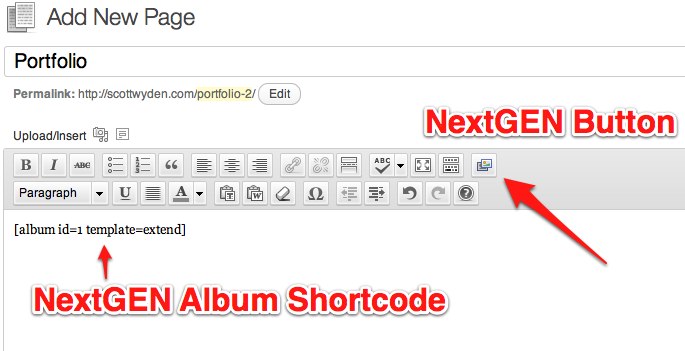
  6. Now it is time to create a page for the portfolio, so click Add New under the Pages tab.
  7. Title your page Portfolio
  8. Click the NextGEN Gallery button and pick the Portfolio album to embed to the shortcode.  Once embedded and ready, click Publish.
You should now have a page on your website called Portfolio, with your first gallery displaying nicely.

Yes this was the quick and easy way to set up NextGEN Gallery on a WordPress website.  However, the plugin is much more powerful than a simple set up and go.

In future articles I will be sharing customization, features, future features (wooooo!) and so much more.

Comment below with your questions about the NextGEN Gallery plugin and we will do our best to include the answer in with the rest of the NextGEN community in the future articles.

Thanks for reading,

Scott

Please note that support for the plugin is not available through comments.  If you have support oriented questions, please visit the support forum at WordPress.
Comments

  1. Great post can’t wait to see more. I do have a quick question about future support… where to place questions? I left a request at the wordpress forum but there is no response and there are many other topics without any attention right now. Are we doing the right thing to post there? Cheers!

  2. How do members setup their own galleries do I create a page with the uploader or do I setup controls somewhere? almost ready to launch just have to get the gallery setup for user uploads as it’s an art teaching site.

    Thanks,Bill

    • While NextGEN Gallery can theoretically handle multiple people using the plugin, it isn’t necessarily designed for it. I am actually working on a website that will let other WordPress users of the site, upload their photos using NextGEN Gallery. I plan on doing a “how it’s made” type article when it’s complete.

      -Scott

  3. Hey Scott,
    Thanks for the reply I have the uploader working for members by setting their role as contributers . My question is how do I setup a page where all the galleries have a thumbnail Image on one page then you click the thumbnail and be brought to their gallery page ,i don’t care if I have to setup the initial page for them as long as they do the uploading as they could be adding stuff daily.I have seen it done I just don’t want to have to setup everyones gallery and maintaining them if I have a thousand members. I want to be doing videos and content instead.
    Any help would be much appreciated as I’m tring to launch by by the 21-22 everything else is ready.

    Thanks,Bill

    • There isn’t a way that you will be able to not manage the galleries for people, but my recommendation would be to set up 1 main album and as people create their own galleries, add each to the album.

  4. Up in 5, 4, 3, 2, 1? — Nonsense. This plugin failed to install any themes – and I mistakenly thought the issue was just a learning curve – it wasn’t; also – I had to hunt down the gallery ID to display – not readily available – it should be.

  5. I’m trying to edit this site for the artist and have never used this plugin before. I optimized here images and want to load them, I am not sure how to go about doing that in an efficient manner. I also thought to upload them without erasing her present galleries, check that they are loading better and then get rid of the present galleries, but I don’t want to lose her info for each pix. Can you help me please?
    thank so much

Speak Your Mind

*